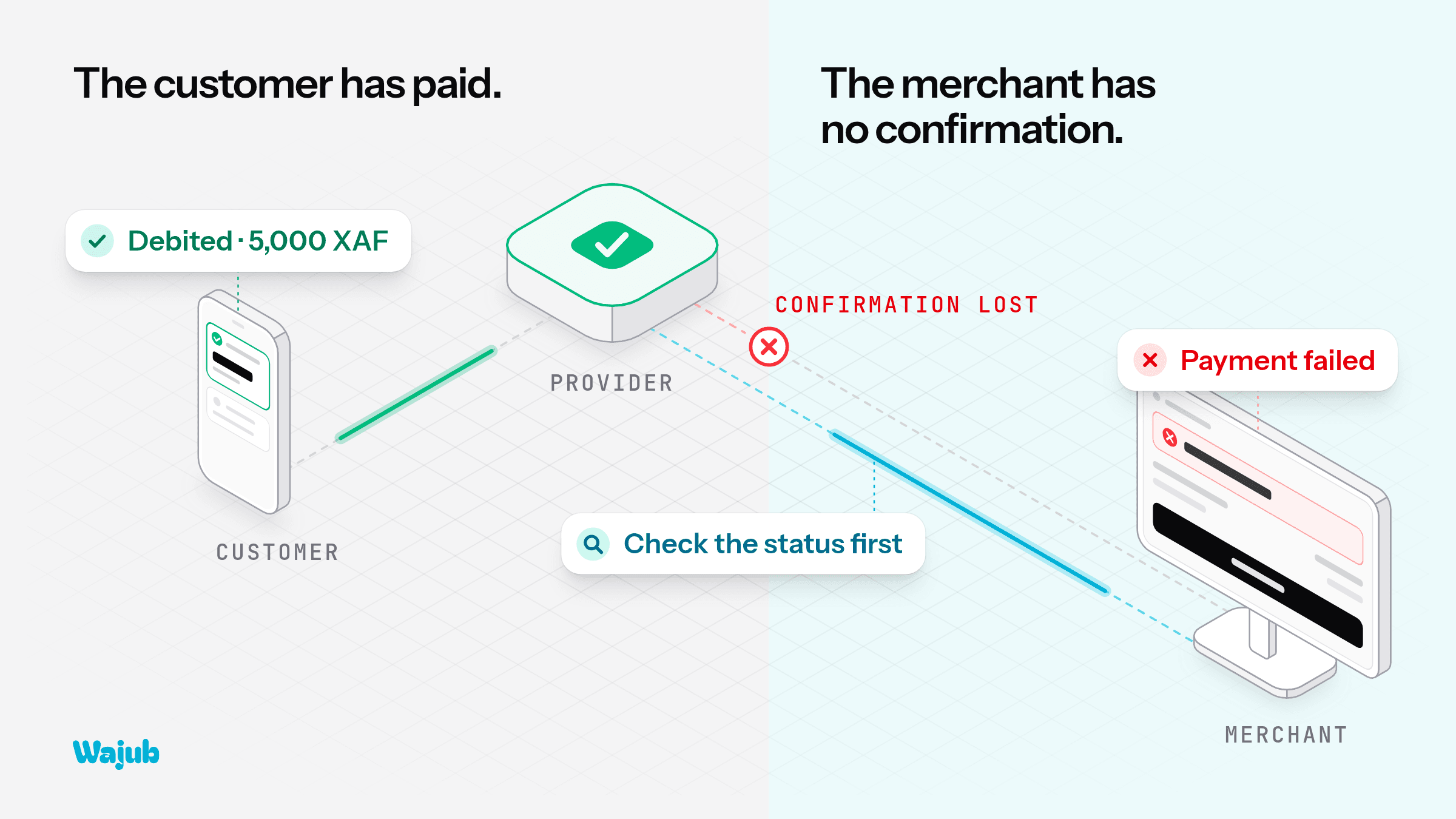
The customer’s account has been debited, but the merchant hasn’t received any payment confirmation. Should the payment be considered unsuccessful? Should the customer be asked to try again?
Not so fast.
Imagine a customer paying for an order using MTN Mobile Money or Orange Money. They approve the payment on their phone and receive a notification confirming the debit. But when they return to the merchant’s website, the order is still pending or marked as “Payment Failed.”
The customer sees that the money has been deducted. The merchant, however, has no confirmation that the payment went through.
This kind of situation can happen during online payments, and businesses need to know how to handle it.
1. Payment Debited, Payment Confirmed: They’re Not the Same Thing
An online payment involves several systems working together. There is the merchant’s website, the payment provider and, depending on the payment method, a bank or mobile money operator.
From Click to Confirmation: What Happens When Someone Makes an Online Payment?
Here is how a typical payment works:
Payment request: The customer chooses a payment method and confirms the transaction.
Transmission: The payment provider sends the request to the relevant network.
Processing: The bank or mobile money operator processes the payment.
Confirmation: The result is sent back to the payment provider and then to the merchant.
The problem is that communication can fail at any point. A payment may go through, but the confirmation may never reach the merchant.
That’s why it’s important to understand the difference between three payment statuses:
Successful: The payment provider confirms that the transaction was completed successfully.
Pending: The final status is not yet available.
Failed or canceled: The provider confirms that the transaction did not go through or was canceled.
Seeing a debit notification on the customer’s phone doesn’t automatically tell the merchant which of these situations applies. And even when a payment is confirmed, it doesn’t necessarily mean the funds are already available in the merchant’s bank account.
2. Why Doesn’t the Payment Confirmation Always Come Through?
There are a few reasons why this can happen.
The payment is still being processed
Not all payments are confirmed instantly. Some transactions take longer to process, and their status may only become available later.
This can happen with certain mobile money payments. MTN Mobile Money’s official documentation explains how merchants can receive transaction updates through callbacks and check a transaction’s status through the API if a notification doesn’t arrive.
Something goes wrong with the connection
The payment provider may have successfully processed the transaction, but a network issue or timeout may prevent the confirmation from reaching the merchant’s system.
The notification never arrives
Payment providers use automated messages called webhooks or callbacks to notify merchants when a transaction changes status.
However, these notifications don’t always arrive on time. Sometimes they fail to arrive altogether, and in other cases, the same notification may be delivered more than once.
That’s why merchants should never rely on notifications alone. They also need a way to check the actual status of a transaction.
3. The Real Risk: Paying Twice for the Same Order
When customers see that their money has been deducted but the website says the payment failed, their first reaction may be to try again.
That’s where things can get complicated.
If the first payment actually went through, trying again without checking its status could result in the customer being charged twice.
This isn’t just a theoretical problem. PayPal documents duplicate transactions in its API under the code DUPLICATE_TRANSACTION. This can happen when a payment request is sent again after a timeout or when a customer submits the same payment more than once.
To reduce this risk, payment systems can use idempotency keys (protection against duplicate operations). In simple terms, they help prevent the same payment request from being processed more than once, even if it is submitted repeatedly.
It’s also important to understand that receiving the same notification twice doesn’t necessarily mean the customer has paid twice. A payment provider may send the same notification more than once, even though only one payment was processed. The merchant’s system must be able to recognize repeated notifications and avoid processing the same financial transaction twice.
When these checks and safeguards are missing, the problem goes beyond technology. It can quickly become a business issue.
For businesses, the consequences can include:
More refund requests and customer complaints.
Orders that have been paid for but are not confirmed by the system.
More work for customer support teams.
A loss of customer trust.
4. Before Asking for Another Payment, Check First!
When a payment status is unclear, the first step should always be to verify the transaction, not ask the customer to pay again.
Here is what the merchant should do:
Keep the transaction reference so the payment can be identified and tracked.
Check the status with the payment provider, either through its API or dashboard.
Verify the amount, currency and transaction reference against the original order.
Check for payment notifications and perform another status check if the transaction is still pending.
Only ask the customer to try again once the first payment has been properly checked.
Payment systems should also include protection against duplicate operations. This helps ensure that sending the same request several times because of a technical issue doesn’t result in multiple charges.
While the payment is being checked, the customer should receive a clear message, such as:
“Your payment is being verified. Please do not try again just yet.”
A simple message like this can prevent unnecessary confusion and potentially avoid a second payment.
5. Why Payment Monitoring Matters as Much as Collecting Payments
Things become even more complicated when a business works with several payment providers. Each provider has its own dashboard, transaction statuses and notification system.
Without a centralized way to monitor payments, teams may have to switch between platforms, check transactions one by one and manually compare information.
This is where payment orchestration comes in.
It gives businesses a way to connect multiple payment providers, monitor transactions from one place and manage their different payment routes more effectively.
That’s what solutions like WAJUB are designed to do: allow businesses to connect their own payment provider accounts and monitor their payment routes through a single dashboard.
But there’s one important rule: when a transaction’s status is still unclear, the system should never automatically retry the payment through another provider without first checking what happened to the original transaction.
Having another payment route available is useful, but knowing the status of the previous transaction is just as important.
Conclusion
A payment that has been debited but not immediately confirmed isn’t necessarily a failed payment. It needs to be checked before any further action is taken.
When several systems are involved in a payment, reliability isn’t just about collecting money. It’s also about knowing what happened to every transaction.
Before asking a customer to pay again, check first.